ARK Shared Mods Manager - Server Tool
PowerShell tooling, WPF UI, CurseForge API workflow, server config automation
- Problem
- Managing ARK server mods as raw CurseForge IDs makes shared server lists hard to read, search, categorize, and apply consistently.
- Work
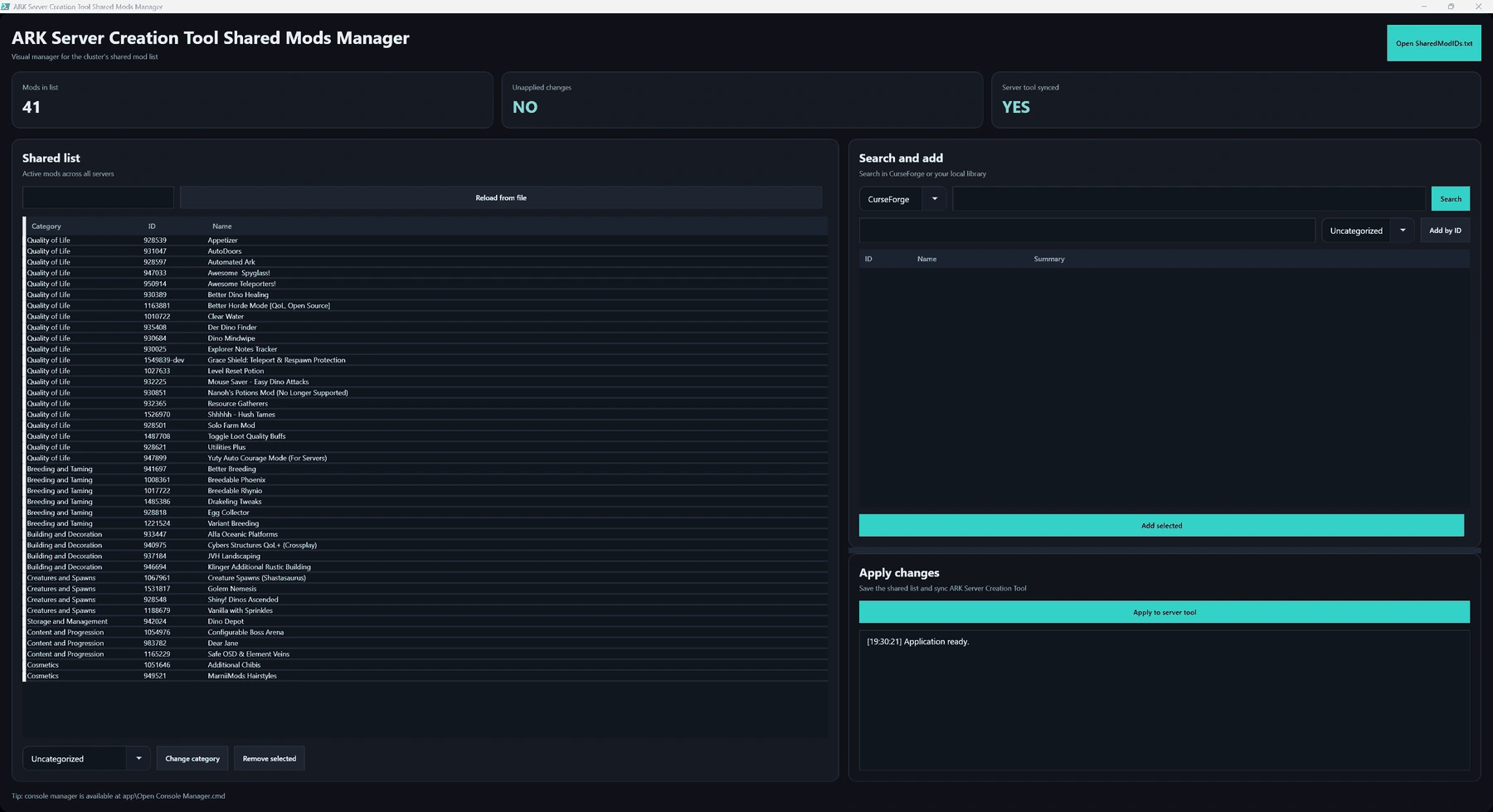
- Built a visual manager that resolves names, keeps categories, searches CurseForge/local mods, adds or removes entries, and applies the shared list to server configs with backups.
- Tech
- PowerShell, WPF, CurseForge API, JSON config editing, local ignored config, Windows launchers
- Result
- A raw ID list becomes a searchable mod-management workflow with safer server-wide apply behavior.
Links
- GitHub repository: ARK Shared Mods Manager
Screenshot
Overview
ARK Shared Mods Manager is an internal desktop tool I built around my ARK: Survival Ascended server setup.
The problem was not only applying the same mod list to multiple servers. The bigger problem was that the list was unpleasant to work with.
Server mod lists are usually handled as raw CurseForge IDs. That works technically, but it is hard to read, hard to search, and easy to edit incorrectly. When a cluster has several servers, that friction gets worse because the list has to stay consistent across every server config.
This tool turns that raw ID workflow into something I can actually read, search, and apply safely.
What It Does
- shows mod names instead of only raw IDs
- displays and preserves categories
- reads installed mod metadata from ARK Server Creation Tool’s local library
- adds mods by CurseForge ID
- looks up CurseForge metadata so new IDs can get readable names
- searches CurseForge from inside the app
- searches the local installed-mod library
- removes selected mods through the UI
- saves a sorted shared list grouped by category
- applies the shared list to every server in
ASCTGlobalConfig.json - updates
-mods=in custom launch arguments when needed - creates a backup before writing server config changes
- shows whether the shared list and server config are in sync
- restores window placement between sessions
- prevents duplicate tool windows
- keeps local paths, settings, and API keys out of git
Why This Was Worth Doing
This is the kind of tool that exists because a workflow becomes annoying enough that doing it by hand stops making sense.
Editing a list of IDs is fine when there are only a few mods. It becomes much worse when the list is long, categorized, and shared across multiple servers.
The important part was making the data understandable before editing it. If I can see the mod name and category, search by name, and remove selected entries visually, the tool reduces mistakes instead of just automating a text replacement.
Implementation Summary
The tool is written in PowerShell with a WPF UI.
The UI loads the current shared mod list, resolves names from the local ARK Server Creation Tool mod library, and can query CurseForge when adding or searching mods. It keeps an in-memory working list until changes are applied.
When applying changes, the backend writes the shared mod list, updates ASCTGlobalConfig.json across the configured servers, updates custom launch arguments where needed, and creates a timestamped backup before writing.
The repo keeps the public tool separate from local machine state. The ARK Server Creation Tool root path, window placement, and API key remain outside git.
Scope
This is primarily personal/internal tooling.
It is public because the workflow and implementation are useful to show, and another server owner could adapt it, but it assumes an ARK Server Creation Tool-style directory layout and config structure.
That specificity is part of the point: it solves a real operational problem in the environment where I actually needed it.
Result
The tool turns a raw mod ID file into a readable management workflow.
It is not a general-purpose mod platform. It is a focused server tool: understand the current list, search for changes, edit safely, and apply the result across the cluster with backups.
Want to talk about this kind of work?
Share the project where it fits. X opens with a question draft; LinkedIn shares the article link.