
Building an Event-Driven Crate Buff Toggle Without Polling
The Real Problem
The core issue was not “how do I remove a buff.”
The actual problem was this:
- a player can preview crate contents with another mod
- opening the crate with active loot-quality buffs can reroll the result
- the rerolled outcome can be different from what the player just saw
So the mod needed to create a player choice at the exact moment before opening the crate:
- keep the currently previewed state as closely as possible
- or allow the normal boosted reroll path
That distinction mattered from the start. This mod was never meant to be a permanent buff suppressor or a crate overhaul. The whole point was giving the player control over a very small but frustrating decision point.
Where The Useful Hook Was
The crate-side investigation was what made the rest possible.
After checking the vanilla supply crate flow, the useful finding was that crate generation reads the active player buffs, casts them to Buff_CrateBoosting_Base, and multiplies crate quality through each buff’s CrateQualityMultiplier.
That clarified the intervention point:
- do not replace the crate system
- do not redesign loot generation globally
- temporarily neutralize the multiplier on the relevant buff instances
That was the turning point, because it reduced the problem from “how do I change crate generation” to “how do I safely override and later restore the right buff instances at runtime.”
What The Crate Flow Told Me
The important vanilla behavior was simple in concept:
- get the player character opening the crate
- inspect the active buffs on that player
- find the buffs derived from
Buff_CrateBoosting_Base - read
CrateQualityMultiplier - use those values in the crate quality calculation
That meant the cleanest intervention was not on the loot container asset itself. It was on the player-side buff state that the crate was already reading.
Why The Mod Ended Up As Two Buffs
Early on, it would have been tempting to make one buff do everything:
- expose the radial option
- store original multipliers
- react to other buffs
- apply and remove the runtime override
That design is possible, but it is not a good fit for this problem.
The UI/control layer wants persistence and a predictable player-facing lifecycle. The runtime override layer wants short-lived state, stored references, and explicit restore behavior.
Splitting them made the logic easier to reason about.
Final Architecture
The project ended up with a two-buff setup.
1. Persistent player control buff
Buff_Player_AddDisableBuff
This buff exists to:
- live on the player
- own the radial menu option
- check whether the real disable buff is active
- add or remove that effect buff on demand
2. Disable effect buff
Buff_DisableLootQualityBuffs
This buff exists to:
- detect crate-boosting buffs derived from
Buff_CrateBoosting_Base - store the original multiplier together with the buff reference
- force those multipliers to
1.0while disable mode is active - restore the original values when the effect ends
That separation mattered. The control/UI layer and the crate override state should not live in the same buff.
How Original Values Are Preserved
The risky part of this mod was never writing 1.0. That part is easy.
The risky part was restoring the original multiplier correctly after the player turned the feature off.
To do that, the effect buff keeps per-buff saved data:
- a reference to the loot buff instance
- the original
CrateQualityMultiplier
That allows the mod to:
- detect a valid crate-boosting buff
- record the original value once
- neutralize it while disable mode is active
- restore the right value to the right buff instance later
Without that instance-based restore path, it would be too easy to lose the real buff state and leave the player with an incorrect multiplier after toggling.
No Tick, No Polling
One detail that matters in this mod is what it does not do.
I did not want a tick-based checker constantly polling player state just to know whether loot buffs exist.
The detection path is event-driven:
- the disable buff subscribes through buff notifications
- it reacts when relevant buffs activate
- it updates stored state from those events
That keeps the feature narrower and easier to reason about than a permanent polling loop, and it fits the actual problem better because crate-relevant buffs change at event boundaries, not because of a constant need to scan every frame.
Bootstrap Needed Two Paths
Like the Drakeling mod, getting the player-side control buff onto the correct player reliably needed more than one route.
The setup uses:
ModDataAsset -> Additional Default Buffs- a server singleton that gives the control buff when players join
The reason for doing both is practical:
- the default buff route is part of the normal bootstrap
- the singleton makes sure joining players receive the persistent control buff through a reliable join-time path
That way the mod does not depend on the player happening to pass through some narrower lifecycle moment before the UI/control layer becomes available.
Why The Radial Entry Is Contextual
One of the better UX decisions here was not exposing the radial option permanently.
The player can have the persistent control buff without needing to see the action all the time. If there is no relevant loot crate buff active, showing the radial option adds noise but not value.
So the mod keeps the feature ready in the background, but only adds the entry when it actually has something meaningful to toggle.
That also makes the radial entry text more honest. It can reflect the current state and switch between:
Enable Loot Quality BuffsDisable Loot Quality Buffs
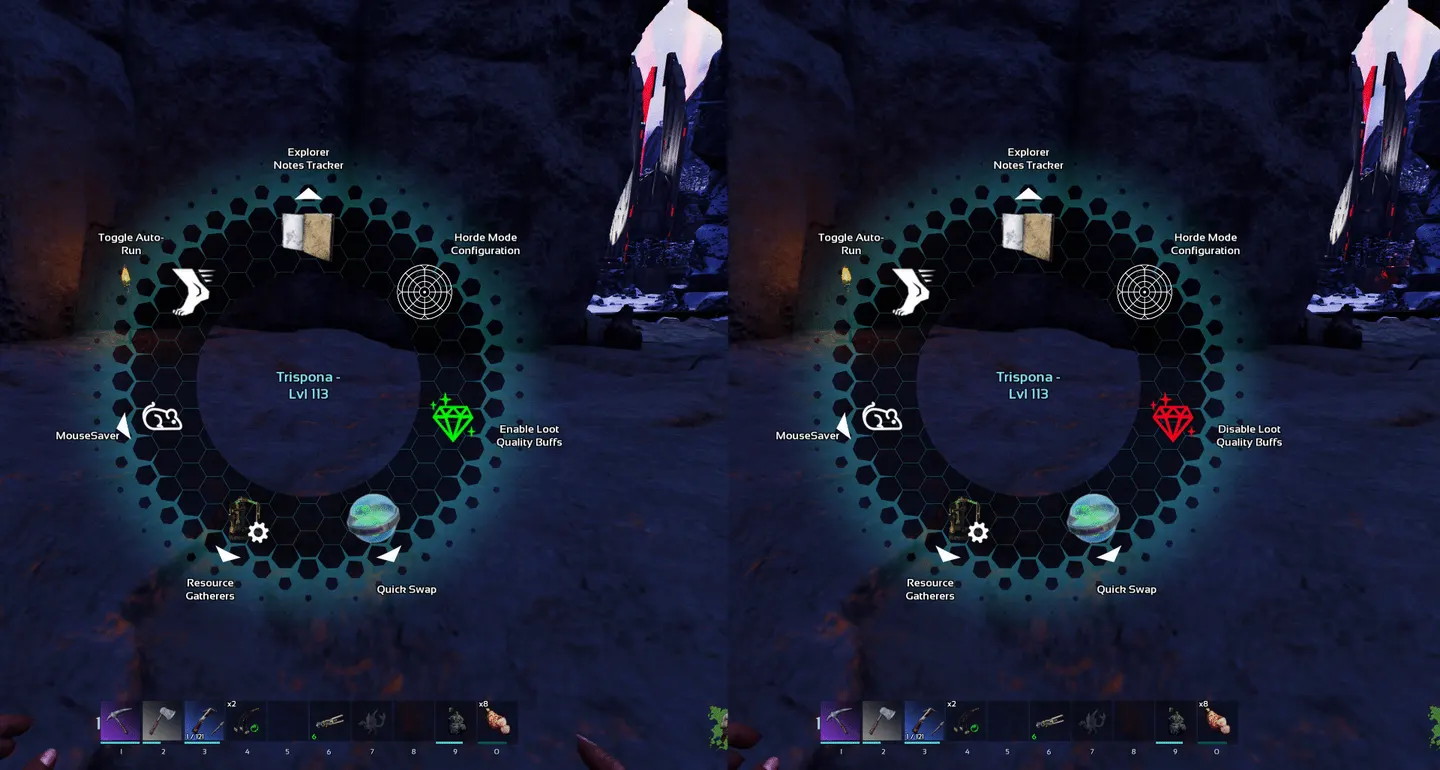
The action is not a permanent UI button. It appears when there is an actual crate-related buff state worth toggling, and its label reflects the current state.
The MultiUse Layer Needed More Care Than Expected
Getting the entry into the radial menu was not just a matter of implementing one node and moving on.
The control buff needed the right multiuse-related setup so that the entry could actually be appended and handled:
Enable Multi UseBlueprint Multi Use EntriesBPAdd Multi Use EntriesAllow Multi Use Entries from SelfBuff Handle Instigator Multi Use Entries
Then the practical flow was:
- receive the incoming multiuse entries
- create the custom entry
- append it
- return the modified array
- gate the selected
UseIndexinBPTryMultiUse - perform the add or remove path on the server
That sounds straightforward after the fact, but it only becomes straightforward once the buff is actually participating in the multiuse flow correctly.
The Parts That Caused Friction
Several things were harder than the final version makes them look.
- misleading debug prints initially made it look like the wrong multiplier was being stored
- restoring original values required a reliable explicit removal path, not just assuming shutdown would behave correctly
- using the effect buff itself as the only radial/menu anchor made the design messier than it needed to be
- multiuse execution could appear to fire twice, which made the toggle look broken because it immediately reversed itself
The clean version only showed up after separating responsibilities and treating the toggle as a server-authoritative state change.
Active Vs Neutralized State
These screenshots are useful because they show the practical player-facing reason for the whole system.
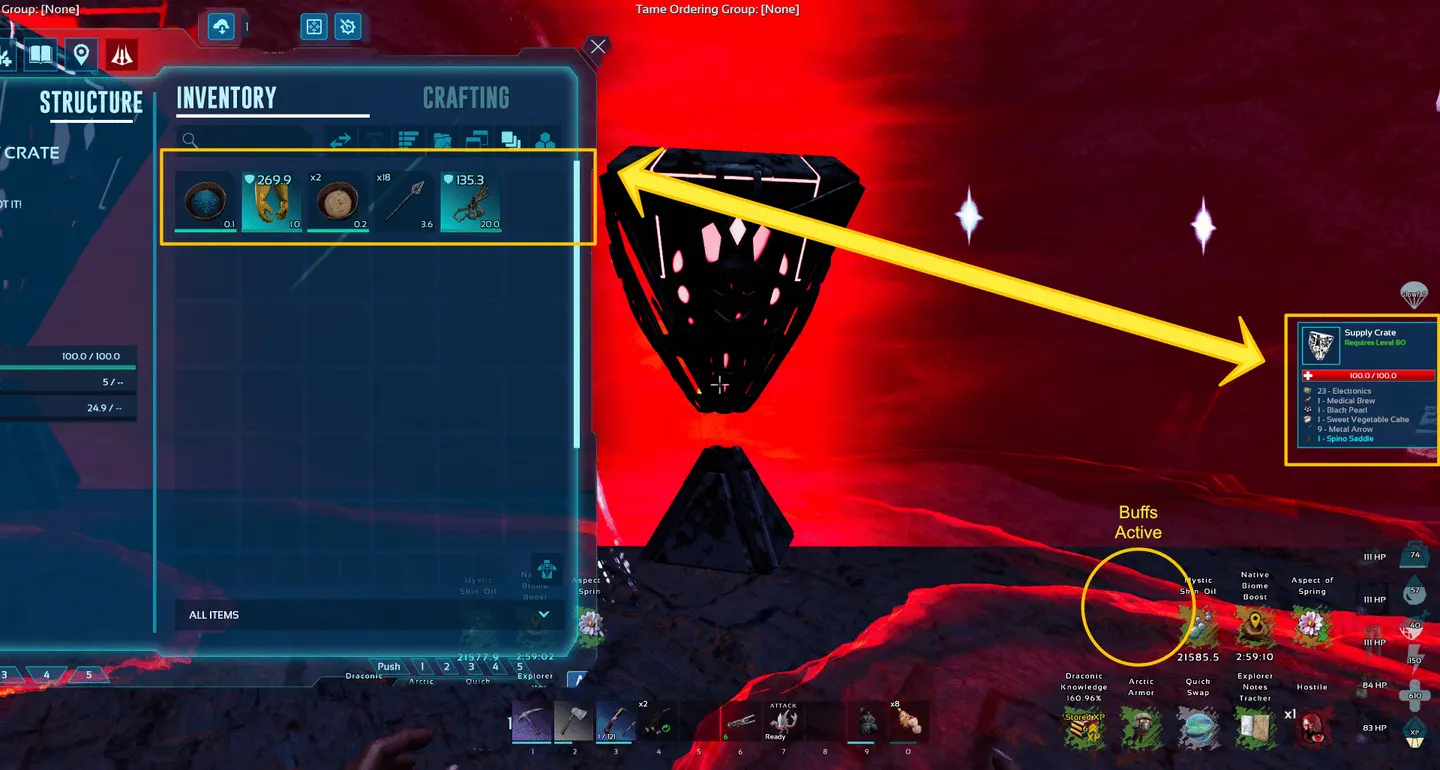
Loot buffs active: the crate can be opened with the boosted reroll path still in play.
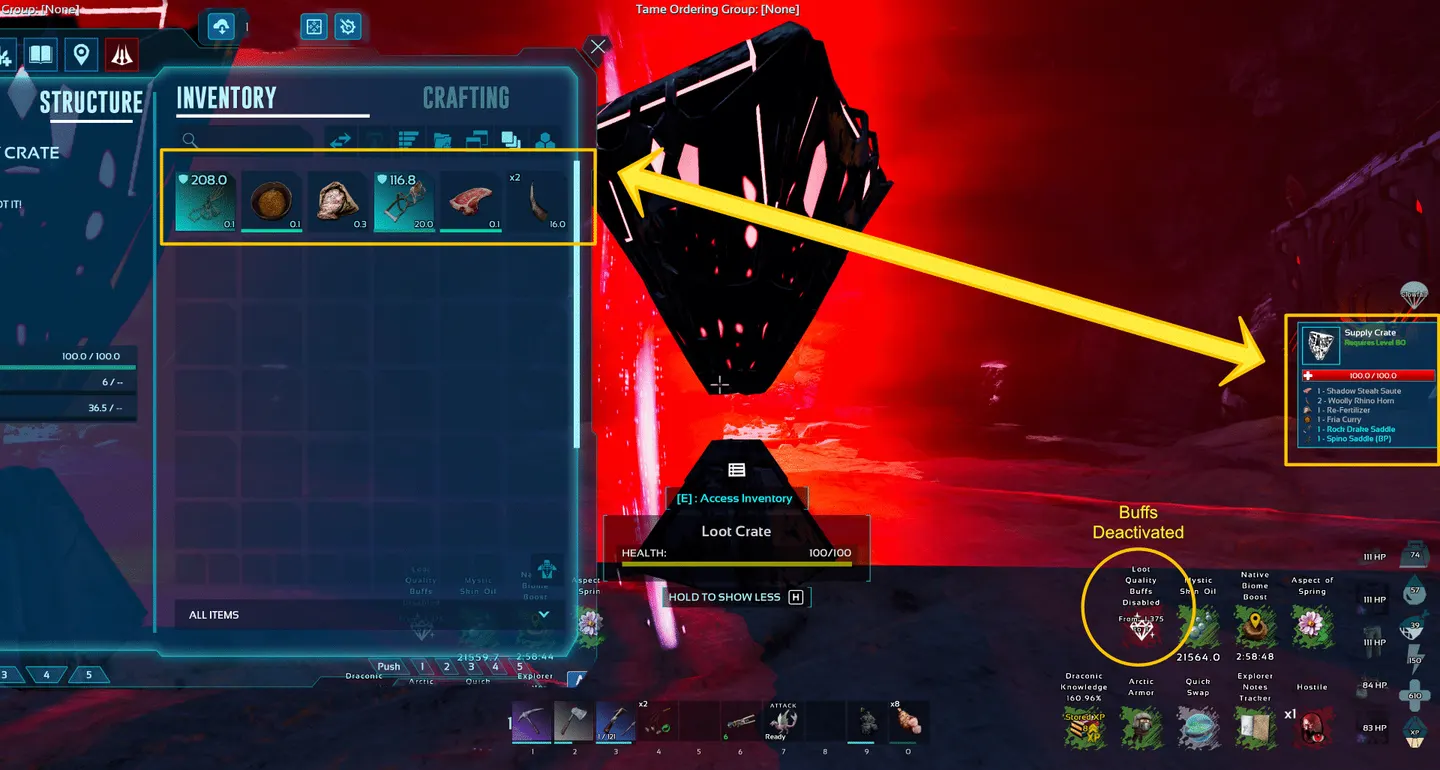
Loot buffs neutralized: the crate opens without those multipliers affecting the result.
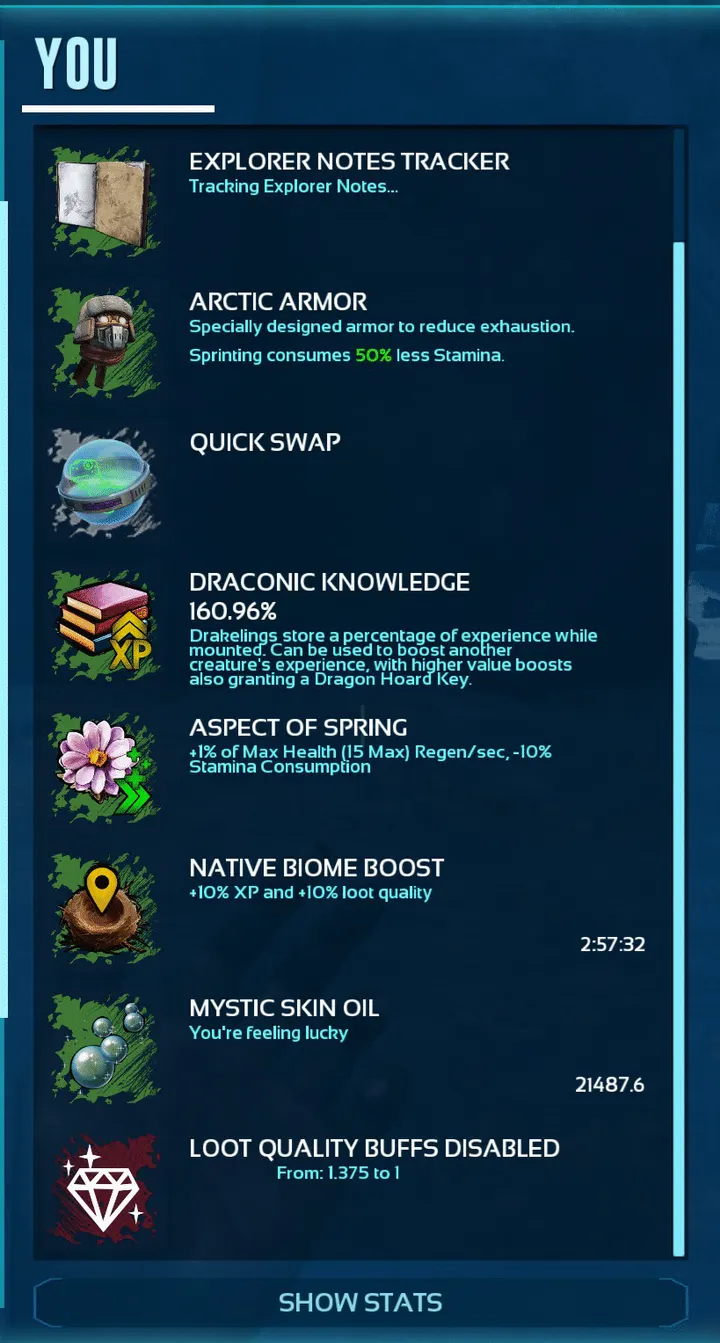
Supporting Structure
Outcome
What I like about this mod is that the technical solution stayed tied to the original player problem all the way through.
The result is not a generalized loot overhaul. It is a small compatibility tool with a narrow intervention point:
- detect the relevant loot buffs through events
- keep the UI control persistent but contextual
- override only the multiplier that the crate logic is already reading
- restore the original state cleanly when the feature is turned off
That is the part I find most satisfying here. The mod does not fight the vanilla system more than it has to.
Related Posts
- Project overview: Toggle Loot Quality Buffs
- Quick note: ASA Quick Note: Adding a radial menu entry from a player buff